
New: move apps between PCs
One mouse.
Every computer.
Push the cursor off one screen and it carries on at the next computer. Your keyboard, clipboard, files and even open apps come with it, all over your own network.
Windows 10 and 11 · Paid once, no subscription · 30-day refund
Main PC
Laptop
Move your mouse across both screens, then type something.One cursor and one keyboard, crossing between two computers.
Features
It feels like one computer with a lot of screens.
New
Drag an app to another computer.
Grab a window by its title bar and drag it through the edge of the screen. CubeCursor opens it on the other computer and closes it here. A browser tab opens at the same page.
- Works both ways, from any of your computers
- Asks before it closes anything
- The app needs to be installed on both computers
Ctrl+C here. Ctrl+V there.
Copy on one computer and paste on any other. Text, pictures and files all come along, with no extra step.
Copied files sync on their own up to 512 MB. For bigger ones, drop them on Bob.
Send anything, any size.
Files, whole folders, zips, videos, a 40 GB backup. Drag it off your desktop straight through the edge of the screen and let go on the other computer. You can also drop it on Bob, or right-click it and pick Send with CubeCursor.
- Folders keep their structure
- Up to 20,000 files in one go
- Several computers at once, each at full speed
Up to nine computers. Sides and corners.
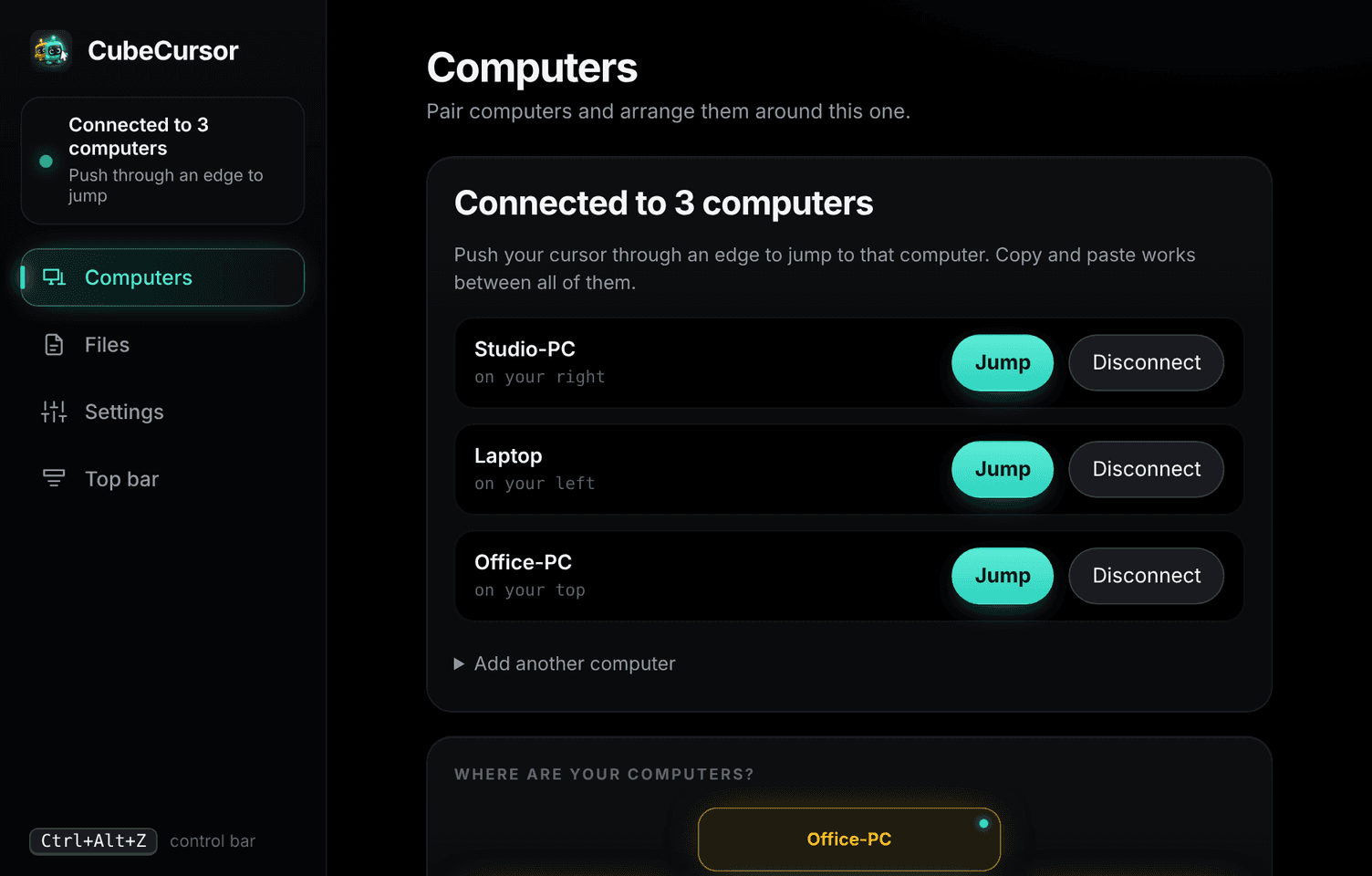
Your main PC sits in the middle. Put the others on any side or in any corner, and the cursor goes to whichever one you push it toward. Hover over a computer to send the cursor there.
You pair each computer once, with a short code.
The cursor is on Main PC, your main PC.
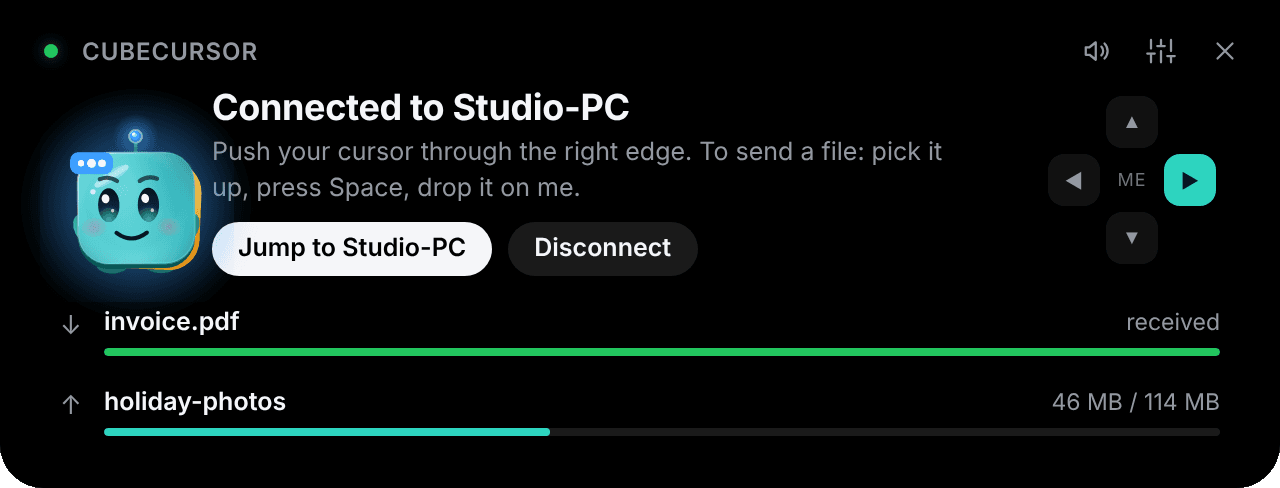
Bob keeps you posted.
A slim bar at the top of your screen shows which computers are connected and how your files are doing. Press Ctrl+Alt+Z to open it, drop a file on Bob to send it, and it folds away when you're done.
And the small things that matter.
Prompts don't trap you
When a permission prompt or the lock screen appears, the mouse and keyboard go back to the PC that needs them.
Send from the right-click menu
Pick Send with CubeCursor on any file or folder in Explorer.
Works with admin windows
Turn on administrator mode to control installers and setup wizards too.
Lives in the tray
Starts with Windows and stays out of the way. Close the window and it keeps running.
One key to get back
If anything ever feels stuck, press Scroll Lock and your mouse comes straight back.
Error reports are your choice
If something breaks, you can send us an anonymous report. It's off unless you turn it on.
How it works
Set up in about two minutes.
- 01
Install it on each computer
Run the installer. CubeCursor sits quietly in the tray.
- 02
Pair with a code
Type the short code shown on one computer into the other, then choose which side it sits on.
- 03
Push the cursor off the edge
It carries on at the other computer, and your keyboard follows.
Privacy
Your typing stays on your desk.
CubeCursor connects your computers directly. Your keystrokes, clipboard and files never go through our servers.
Direct and local
Computers talk over your own Wi-Fi or cable, with no cloud relay in between.
Encrypted
Everything between your computers is encrypted with a key made from the pairing code.
No tracking
The app has no ads or analytics. Error reports are only sent if you turn them on.
Pricing
$10. Once.
No subscription. Pay once and it's yours, including updates.
One licence covers your whole desk
Enter the key on your main PC. The up to eight computers connected to it don't need their own key. Got a new PC? Move the licence to it in a couple of clicks.

- Mouse and keyboard across up to 9 computers
- Clipboard with text, pictures and files
- File transfers with no size limit
- Move apps and browser tabs between computers
- Download right after you pay
- 30-day money-back guarantee
Your licence key appears in your account as soon as you've paid.
Which systems does it run on?
Windows 10 and 11 (64-bit). A macOS version is in testing now, and it will work together with your Windows PCs.
Does it need the internet?
Your computers talk to each other directly over your own Wi-Fi or cable, so the internet isn't needed to use them together. Your main PC checks in with us every few days to confirm the licence; the check only sends the licence key and an anonymous code for that PC.
How many computers can I connect?
Your main PC plus up to eight more: one on each side and one in each corner. You decide where each one sits, and the cursor goes there when you push it off that edge or into that corner.
How does the licence work?
Enter your key on your main PC. The computers connected to it don't need their own key. Changed PCs? Move the licence in the app or free it from your account, then enter the key on the new one.
Is there a file size limit?
No. Send one huge file or a whole folder; one send can hold up to 20,000 files. Files you copy with Ctrl+C sync on their own up to 512 MB. For anything larger, drop it on Bob.
Which apps can I move between computers?
Most programs, as long as they're installed on both computers, and browser tabs, which open at the same page. CubeCursor asks before it closes anything.
Is my typing safe?
Your keystrokes only travel between your own computers, encrypted with a key made from your pairing code. None of it is sent to us.
Is it a subscription?
No. It's $10, paid once.
Can I get a refund?
Yes. If it doesn't work for you, email us within 30 days and we'll refund you in full.
Give your desk one mouse.
Set it up in two minutes. If it isn't for you, get your money back within 30 days.
Get CubeCursor · $10